



Bring your own repo
Point doze at your own project, let it write a doze.hcl from what it finds, and bring it up.
Give doze a project of your own, let it write the doze.hcl, and bring it up.
doze reads your project and suggests a file. It starts nothing while it reads, and every block it writes says why it is there, so you can delete a wrong guess.
Open the folder
Section titled “Open the folder”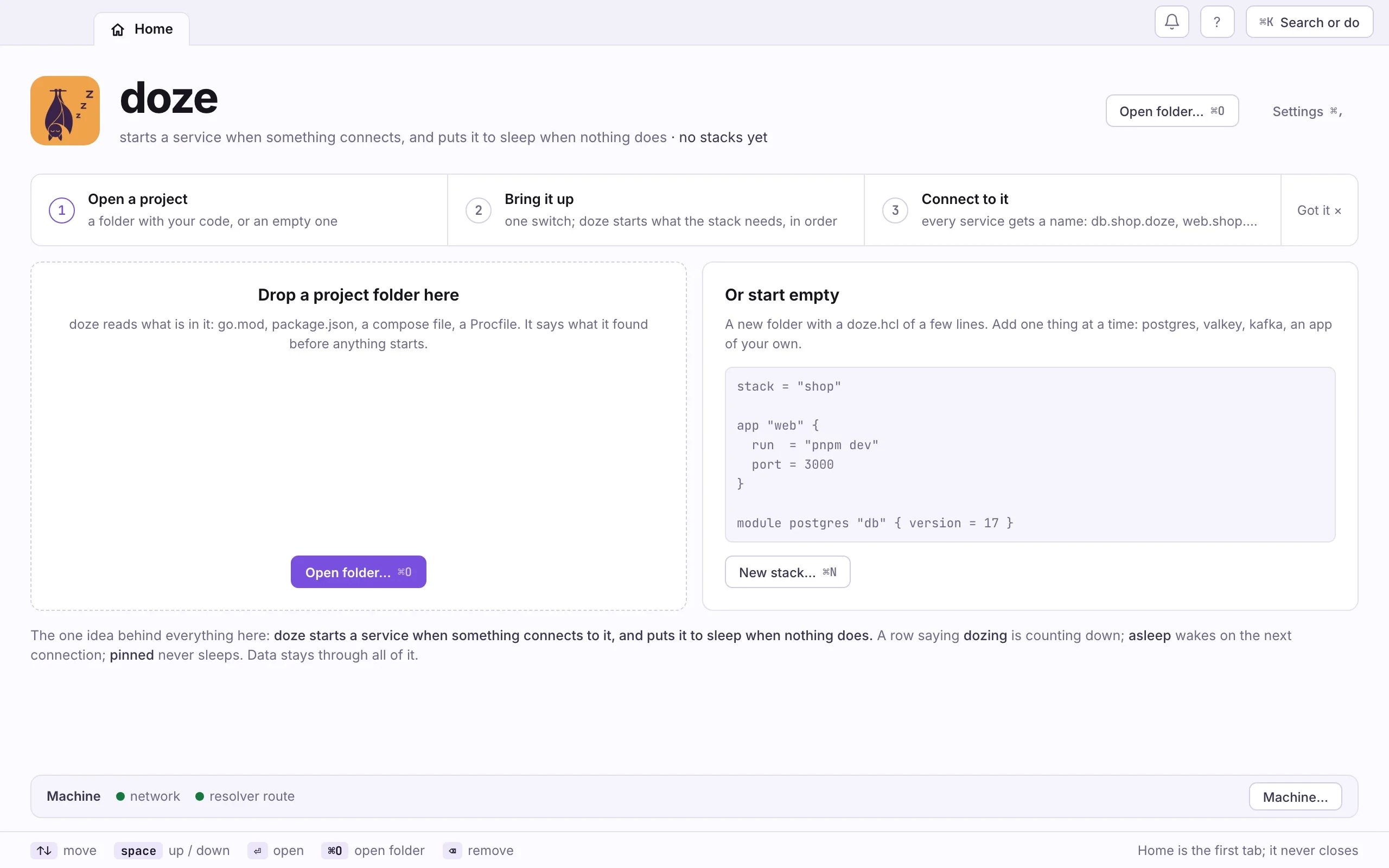
- Drop your project folder on the window, or press ⌘O and pick
it. A folder that already has a
doze.hclappears on Home, stopped. - A folder without one opens on what doze found, one line each: the name, the file it came from, and the block it becomes.
- Pick one of three ways to start. Each writes
doze.hcl; nothing runs until you bring the stack up.- Set it up from this repo: the file from what doze found. The same as
doze init. - Add one thing: name a module or a service (postgres, valkey, mongo).
The same as
doze add. - Start with an empty file: a short
doze.hclwith comments, to fill in.
- Set it up from this repo: the file from what doze found. The same as
- Open
doze.hclin your editor and read it. After this the file is yours: doze never edits it behind your back.
cd ~/code/shopdoze init # read the project, write doze.hcldoze lint # check it without starting anythingdoze updoze init --wizard asks instead of reading. doze init --force replaces a
doze.hcl that is already there.
What doze looks at
Section titled “What doze looks at”- Go:
go.mod, the imports of eachmainpackage, and the environment variables the code reads.github.com/jackc/pgxmeans Postgres;os.Getenv("REDIS_ADDR")is wired to Valkey’s address. - JavaScript and TypeScript:
package.json. Adevscript becomes anapp;pg,ioredis,kafkajsor@aws-sdk/client-s3become modules. - A compose file: each service. An image doze has a module for (postgres,
redis, kafka, mariadb, localstack) becomes that module; any other image
becomes a
servicethat runs the container. - A Makefile: targets such as
migrate,seedorsetupbecome tasks. .env: the variables your apps read.
For a project with a compose file, a pg dependency and a dev script,
doze init prints what it found and writes this:
stack = "shop"
# package.json depends on pgmodule postgres "db" {  version = 18  port    = 5432}
# docker-compose.yml has a mail service (axllent/mailpit)service "mail" {  # a container: a container is just a command, and `run` stays in the foreground  run  = "docker run --rm -p $HOST:$PORT:1025 axllent/mailpit"  port = 1025}
# package.json has a dev scriptapp "shop" {  run = "npm run dev"}
Check two things before doze up:
- Versions. doze picks the newest engine its module offers. If your compose
file said
postgres:16and you keep data from it, writeversion = 16. - Names. To give every service a
<name>.<stack>.dozename, adddefaults { names = true }.doze init --wizardwrites it for you. See Names and addresses.
Add one thing at a time
Section titled “Add one thing at a time”doze add writes one block beside what is there, without reformatting the
rest, and shows the line that wires it into an app:
doze add postgres # module postgres "db", from the registrydoze add valkey --dry-run # show the block, write nothingdoze add mongo # not a module: added as a servicedoze add mongo --as container # run it with dockerdoze add mongo --as download # fetch a release archive once, pin itA name that is not a module in the doze registry is added as a service. doze
offers three ways to run it: a binary already on your PATH (--as installed),
a container, or a download. More in Your own services.
Coming from docker compose
Section titled “Coming from docker compose”doze init reads a compose file for you, but the two models differ. This is
how compose’s ideas map onto doze’s:
| In compose | In doze | The difference |
|---|---|---|
services: entries |
module blocks for what the registry has; a service block for anything else; an app block for your code |
A module is real software, pinned and checked, not a mutable image tag. |
image: postgres:16 |
version = 16 |
Pinned to an exact build in doze.lock; :16 moves, the lock does not. |
ports: ["5432:5432"] |
port = 5432 |
No NAT: the engine listens on your machine directly. |
depends_on: |
after = [module.db], or a reference such as DATABASE_URL = module.db.url |
A reference is an order too: doze starts db first. |
healthcheck: |
Built into each module; ready = http("/healthz") for your own apps |
Modules know their engine’s readiness. |
volumes: |
Nothing to write | Each service keeps its data under ~/.doze. doze reset db for a clean slate. |
environment: / .env |
env = { … }, env_file, variable blocks with --var |
Values can be references to other blocks. |
docker compose up -d |
doze up |
Then each service sleeps when nothing uses it. |
docker compose down |
doze down |
Sleeps everything, keeps the data. |
docker compose logs -f api |
doze logs -f api |
Works while api is asleep too. |
docker exec -it db psql |
psql "$(doze url db)" |
Your own psql, to a native process. |
What compose has no word for: doze creates the roles, databases, buckets and topics you declare, and stops there; your migrations own the rows. And a service nobody is using goes to sleep, so a quiet stack costs almost nothing.
Next: How doze thinks.