



Microservices
Run a stack of your own services in Go, Python and TypeScript, in order, beside the databases they use, from one doze.hcl.
You’ll be able to run ten services of your own, in three languages, with their databases, migrations and installs, started in the right order by one command.
What Larder runs
Section titled “What Larder runs”| Kind | Blocks | Language |
|---|---|---|
| Apps with a port | identity, catalog, orders, payments, gateway |
Go |
fulfilment, recommendations |
Python, with uv | |
storefront |
TypeScript, Vite on bun | |
| An app with no port | notifications |
TypeScript on bun |
| Shared services | postgres, redis (Valkey), kafka, aws |
modules from the registry |
| Your own service | mailpit |
a download, pinned in doze.lock |
| Tasks | migrate-*, install-*, seed-catalog |
run before the apps that need them |
Every app is a native process on your machine: your debugger attaches to it,
and go run, uv run and bun --watch reload the way they do in a terminal.
One app, read line by line
Section titled “One app, read line by line”app "catalog" { run = "go run ./services/catalog" watch = ["services/catalog/**/*.go", "platform/**/*.go"] port = 8002 ready = http("/healthz") after = [task.migrate-catalog]
env = { DATABASE_URL = "postgres://catalog:catalog@${module.postgres.address}/postgres?sslmode=disable" AWS_ENDPOINT_URL = module.aws.url IMAGES_BUCKET = "product-images" }}runis the command, run throughsh -cfrom the folderdoze.hclis in (or fromdir, if you set one).portis where other services reach it. doze holds that port and starts the app with$PORTset to a private one, so the app must listen on$PORT. That is how a sleeping app wakes on its first request. See Apps.readysays when the app is ready: here, when/healthzanswers. Anything that waits oncatalogwaits for that, not for the process to exist.afterlists what must happen first.task.migrate-catalogruns beforecatalogstarts.envcan point at other blocks.module.postgres.addressandmodule.aws.urlare filled in by doze, and each reference is also an order:catalogwaits forpostgresandawsto be ready.watchrestarts the app when those files change.
The same block shape works for every language. Only run changes:
app "fulfilment" {  dir   = "services/fulfilment"  run   = "uv run --frozen python -m fulfilment"  port  = 8005  ready = http("/healthz")  after = [task.install-fulfilment]}
app "storefront" {  dir   = "apps/storefront"  run   = "bun run dev"  port  = 5173  ready = http("/")  after = [task.install-storefront]  env   = { GATEWAY_URL = app.gateway.url }}
A Vite dev server takes its port from its own config, so Larder’s
vite.config.ts reads PORT (and HOST) from the environment, with
strictPort: true. An app that listens on a
port of its own instead of $PORT is never ready; see
Troubleshooting.
Workers with no port
Section titled “Workers with no port”notifications reads Kafka and sends email. Nothing calls it, so it has no
port, and its ready is a line in its own output:
app "notifications" {  dir   = "services/notifications"  run   = "bun src/index.ts"  ready = log("consuming")  after = [task.install-notifications]
  env = {    KAFKA_BROKERS = module.kafka.address    SMTP_ADDR     = service.mailpit.address  }}
An app with no port runs until you stop it. An app with a port sleeps after two minutes with no connections and wakes on the next request. A consumer gets its work from Kafka, not from requests, so nothing would ever wake it. Larder keeps those awake:
app "orders" { run = "go run ./services/orders" port = 8003 sleep = "never" # it consumes Kafka: no request would ever wake it}More in Sleep and wake.
Migrations and installs are tasks
Section titled “Migrations and installs are tasks”A task runs to the end and stops. An app that lists it in after waits for
it to succeed. With inputs, it runs again only when those files change:
task "migrate-catalog" {  run    = "go run ./platform/cmd/migrate services/catalog/migrations"  inputs = ["services/catalog/migrations/*.sql"]  env    = { DATABASE_URL = "postgres://catalog:catalog@${module.postgres.address}/postgres?sslmode=disable" }}
task "install-fulfilment" {  dir    = "services/fulfilment"  run    = "uv sync --frozen"  inputs = ["pyproject.toml", "uv.lock"]}
# Only when asked.task "seed-catalog" {  run    = "go run ./platform/cmd/migrate services/catalog/seed"  manual = true  after  = [task.migrate-catalog]  env    = { DATABASE_URL = "postgres://catalog:catalog@${module.postgres.address}/postgres?sslmode=disable" }}
Each Larder service migrates its own schema as its own Postgres role, so one
service cannot touch another’s tables. The roles and schemas are declared on
the postgres module. See Tasks and
Start order and readiness.
A manual = true task never runs by itself. Run it when you want it:
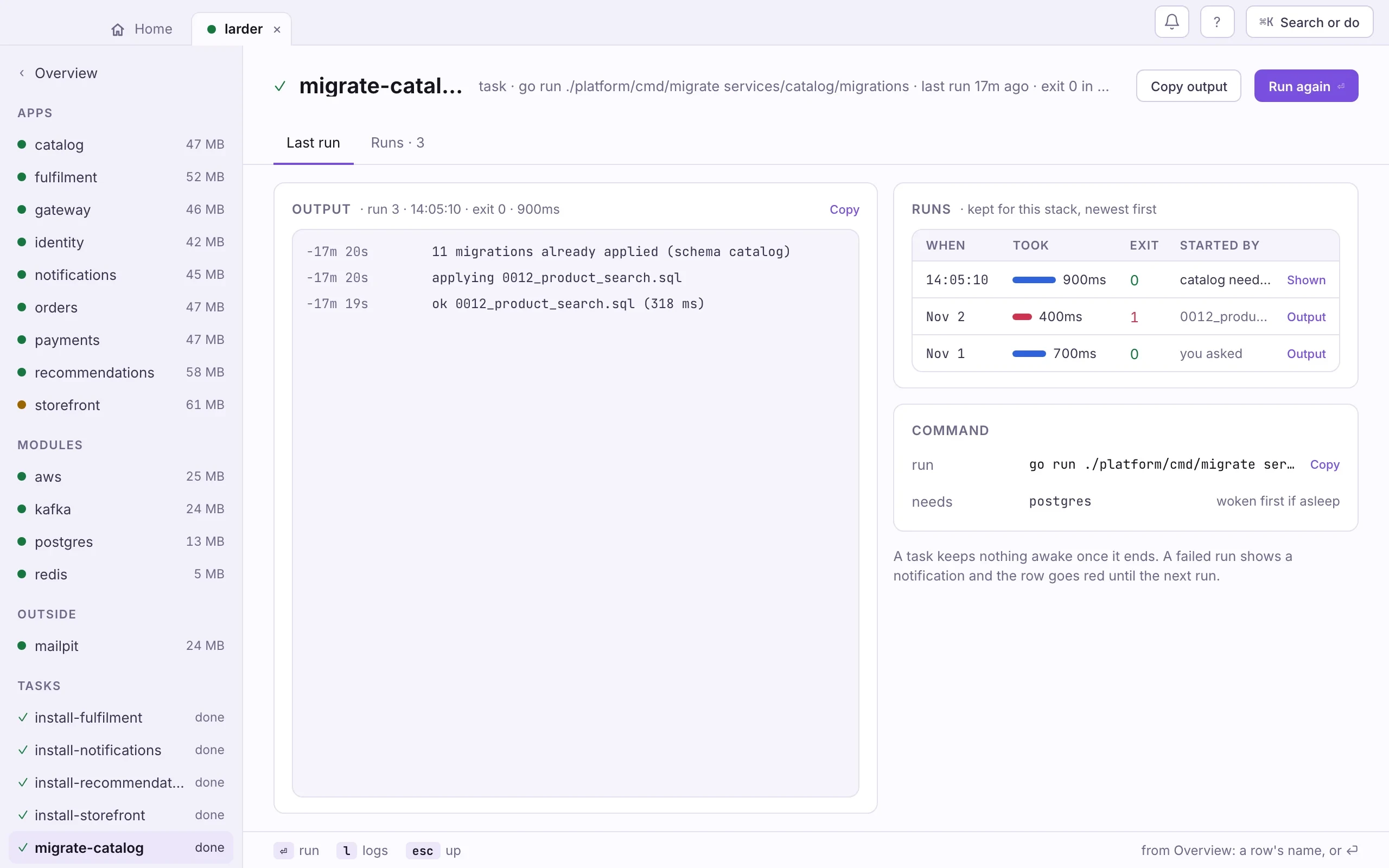
- Open the stack and pick the task under Tasks in the sidebar.
- Press Run (or ⏎). What it needs wakes first; the output appears on the page as it comes.
doze task seed-catalogdoze taskdoze task <name> runs it now and returns when it is over, exit 0 or 1 with
its output. With no name it lists every task and how it last ran.
Bring it up
Section titled “Bring it up”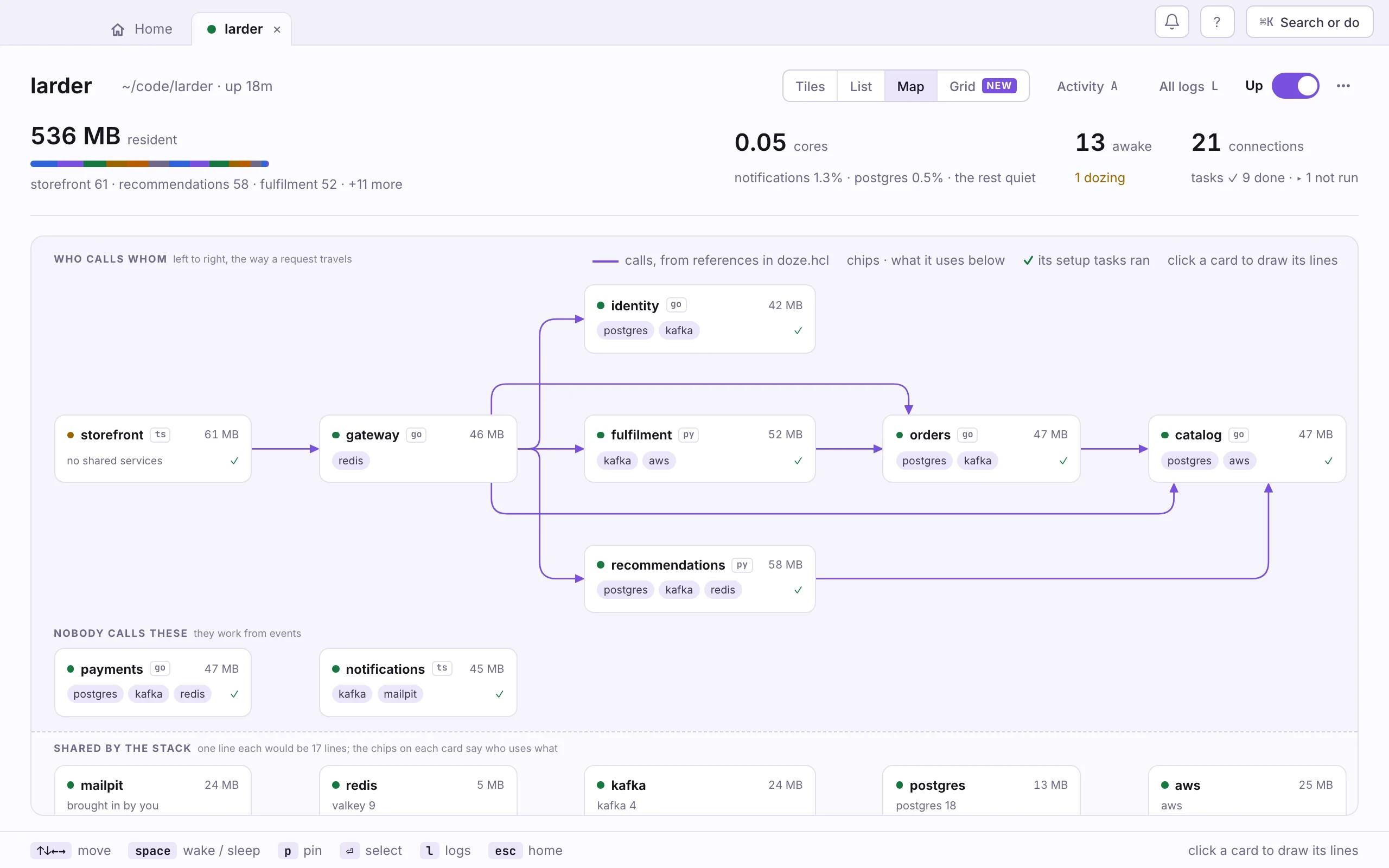
- Add the folder. Drop the
larderfolder on the window, or press ⌘O and pick it. - Flip its switch on. Tasks run first, then each app in order.
- Press 3 for the Map to see who calls whom, and a ✓ on each card whose setup tasks ran.
cd doze-examples/larderdoze updoze status --graphdoze up returns when everything is ready. doze status --graph draws the
order doze worked out.
To work on two services, start only those: doze up storefront gateway
starts them and everything they reference. In the app, while the stack is
down, the … menu beside its switch has Choose what starts…. Next time, doze up asks whether to
start the same set again.
Run a test against the stack
Section titled “Run a test against the stack”doze run makes sure the stack’s daemon is up, then runs your command. With
--env it also sets the connection variables that doze env prints, such as
DATABASE_URL:
doze run --env -- go test ./...Without --env nothing is added to the command’s environment. Larder’s apps
get their variables from their own env blocks, so they need neither.
Keep the data somewhere else
Section titled “Keep the data somewhere else”You don’t have to run the databases. If your team shares a database on a
server, leave the module out and put its address in env. doze runs and
orders your services; the database is just a string to it:
app "catalog" {  run   = "go run ./services/catalog"  port  = 8002  ready = http("/healthz")
  env = {    DATABASE_URL = "postgres://catalog@db.dev.internal:5432/larder"  }}
Mix the two as you like: a local Postgres and a shared Kafka, or the reverse. Only blocks are started, ordered and woken.
Anything not in the registry
Section titled “Anything not in the registry”Larder catches email with mailpit, which is not a doze module. It runs as a
service that doze downloads once and pins in doze.lock. See
Your own services.
Where to go next
Section titled “Where to go next”- Everyday workflows: logs, tasks, switching services off and on.
- References and env: every attribute a block publishes.
- Splitting files: a stack this size in several files.