



Troubleshooting
What to do when a service crashes, a port is taken, a name does not resolve, an app is never ready, or doze.hcl does not load.
On this page
You’ll be able to find out why a service is not doing what you expect, and fix the common causes.
The examples use Larder, a made-up grocery service.
Where to look first
Section titled “Where to look first”- Look for red. A stack’s tab shows a count of what needs you, and so does the bell at the top right.
- Open the service. Its page says what went wrong, shows the last lines it printed before it exited, and offers the fix it can.
- Check the machine: Settings › Machine is the same report as
doze doctor, with a Repair button.
doze status # each service's state, and a note on what went wrongdoze logs orders # what it printed in its newest rundoze logs orders --run -1 # the run beforedoze doctor # the machine setup and the configA service’s state tells you where to start:
| State | Meaning |
|---|---|
| awake, dozing | running; dozing means nobody is connected and it will sleep soon |
| waking | starting, and not ready yet |
| asleep | not running; the next connection wakes it |
| crashing | it exited by itself, and doze will start it again shortly (doze status shows the try, such as crashing 3/5) |
| failed | nothing is running and something went wrong: the tries ran out, or the start never got as far as running |
| off | you switched it off (doze off); nothing wakes it until doze on |
A service keeps crashing
Section titled “A service keeps crashing”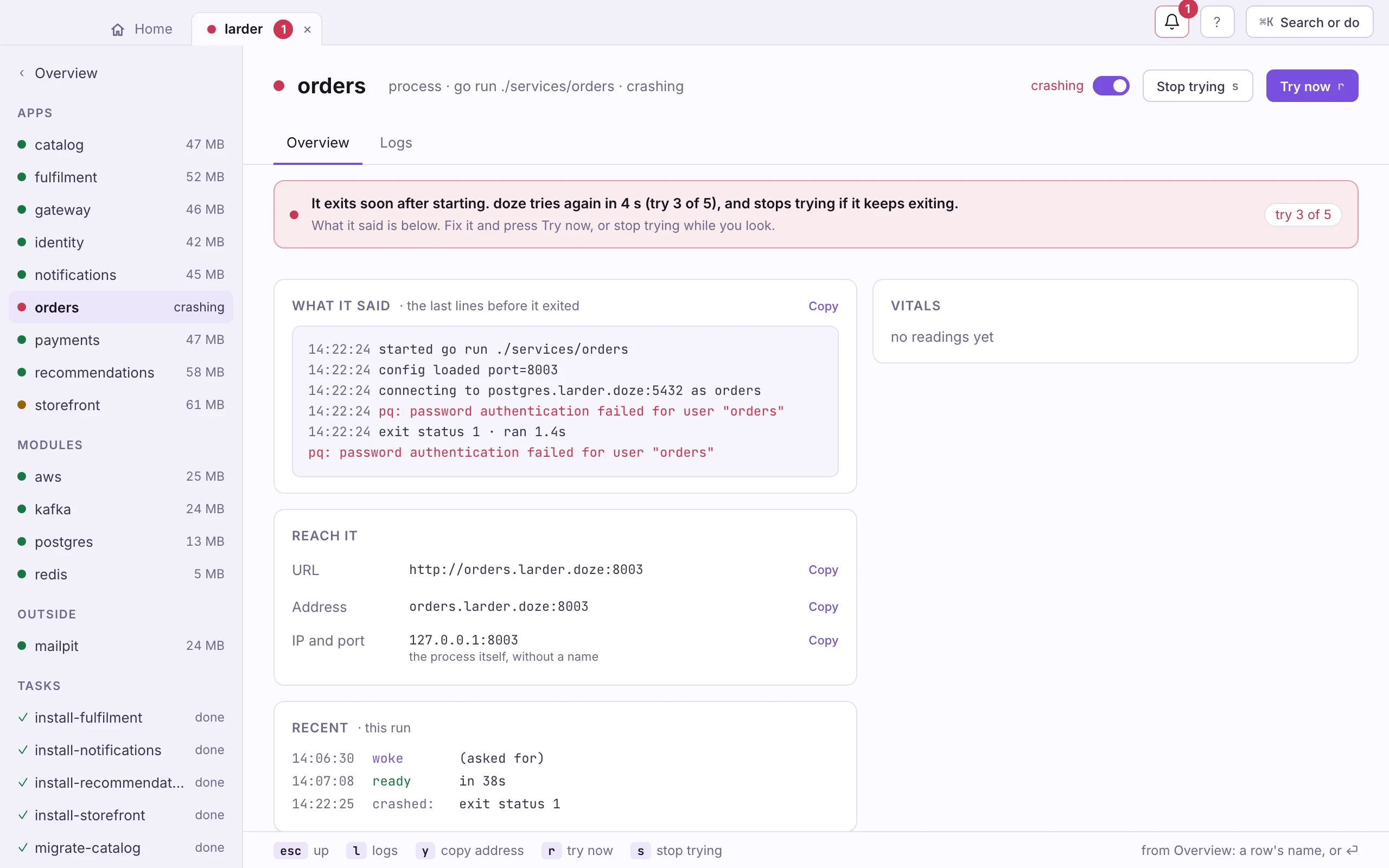
The service starts and exits. doze starts it again, waiting longer each time,
up to the restart block’s max_retries, then marks it failed.
- Read what it said. In the app it is on the service’s page; in a terminal,
doze logs <name>, ordoze logs <name> --run -1for the run before. - Fix the cause. In the example above, the
ordersrole’s password in the service’senvdoes not match the one on thepostgresmodule. - Start it again: Try now (r) in the app, or
doze restart orders. Stop trying (s) takes it out of the run while you look;doze on ordersbrings it back.
More in When something breaks.
A port is taken
Section titled “A port is taken”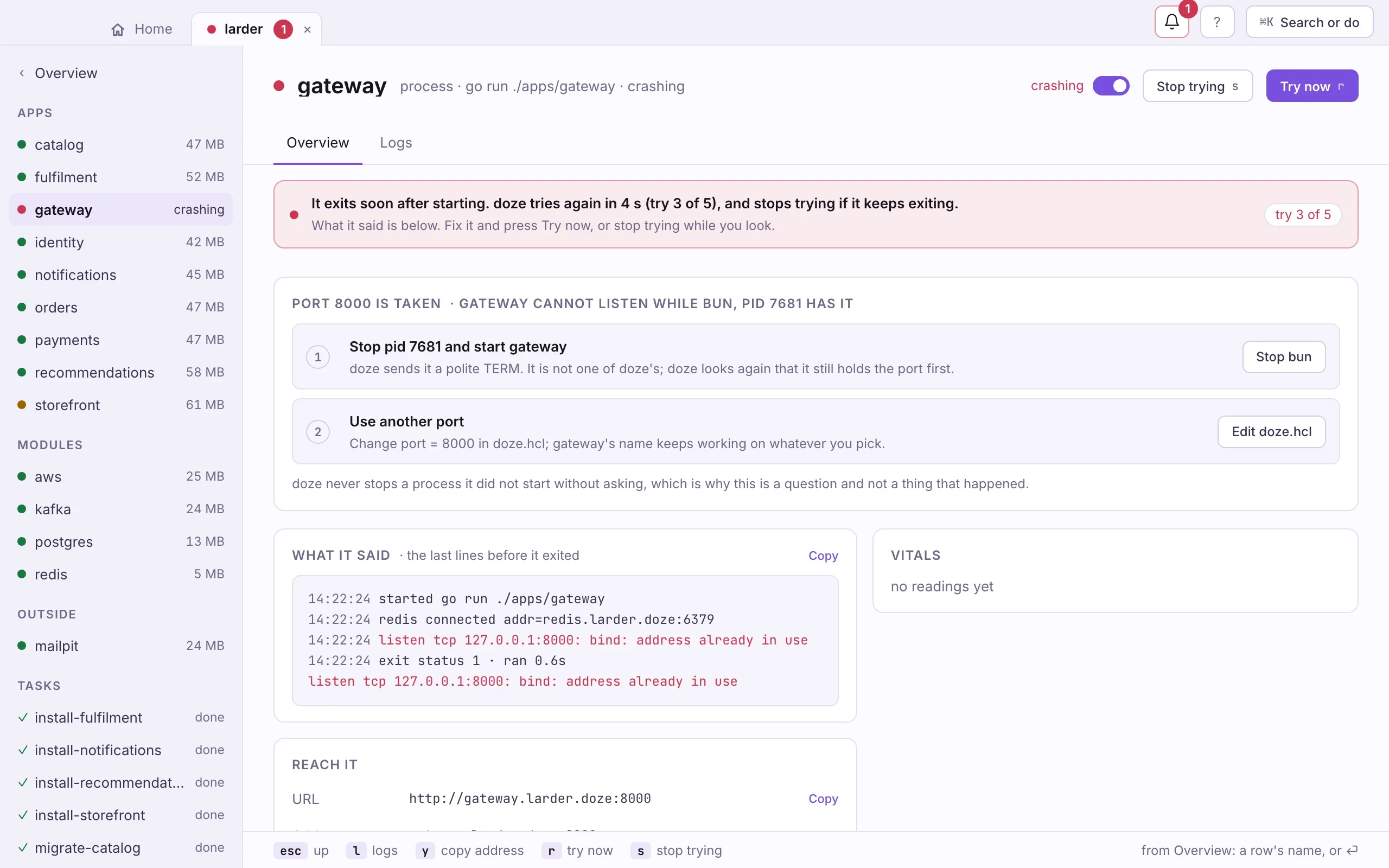
Another program is on the port a service wants. The app names it and offers two fixes: stop that process (doze asks first; it never stops a process it did not start on its own), or use another port.
In a terminal, find it yourself:
lsof -nP -iTCP:8000 -sTCP:LISTENThen stop it, or give the block another port in doze.hcl. With names on,
the service’s name keeps working whatever port you pick. A
personal override file changes a port for you alone.
On a Mac with names set up, each service has an address of its own, so two stacks can both use 5432. A clash then means a program outside doze holds the port.
An app is never ready
Section titled “An app is never ready”An app with port = 3000 does not listen on 3000: doze holds that port and
starts the app with $PORT set to a private one, and the app is ready when
$PORT answers. An app that ignores $PORT and listens on its own port (vite
on 5173, a server hard-coded to 3000) is never ready, and its start fails after
the ready timeout. doze then looks at what the app’s processes do listen on and
says so:
web listens on :5173, not on $PORT (41234) that doze gave it; start it with--port $PORT (vite: --port $PORT --strictPort), or set direct = true to have dozeleave its port aloneThe fix is to read $PORT (and $HOST): vite --port $PORT --strictPort,
next dev -p $PORT, or os.Getenv("PORT") in your own server. If the app
must bind its declared port itself, set direct = true; doze then starts it
but does not front it (no waking on a connection).
“started but listens on no port” means the app is up but has bound nothing
yet. A slow first compile wants a longer ready_timeout (Larder sets
ready_timeout = "3m" in defaults for its first go run), or the app is
waiting on something else. See Apps.
doze.hcl does not load
Section titled “doze.hcl does not load”doze lint checks the file without starting anything and prints the file,
the line and what to write. In the app, the stack’s page shows the same
message with the line and an Edit doze.hcl button.
A running stack keeps the file it started with, so a broken save does not stop anything. Once the file loads, restart the stack to apply it.
An error that says something “is now” something else comes from a doze 0.1 spelling; see Upgrading from 0.1.
A task failed
Section titled “A task failed”An app that lists the task in after does not start. Open the task in the app
to see its output, or run it in a terminal to see it fail:
doze task migrate-catalogFix it and run it again; the waiting app starts after it succeeds.
A .doze name does not resolve
Section titled “A .doze name does not resolve”doze dns-setup --checkIf a line is missing, run the setup again: Repair under Settings ›
Machine, or doze dns-setup (one password). A machine set up by an older doze
may need it once more; doze doctor says so.
On Linux, names need systemd-resolved or dnsmasq. With only a plain
/etc/resolv.conf, per-stack names cannot resolve; switch them off and use
addresses. See Linux.
To work without names at all, for one run or in CI, set DOZE_ZONE=off, or
defaults { names = false } in the stack. Each service then listens on
127.0.0.1 at its own port.
An https domain is not trusted
Section titled “An https domain is not trusted”doze trust --checkdoze trust routes each domain an app declares to doze, and trusts doze’s
local certificate authority, with one password. Run it again after adding a
domain. doze trust --rotate makes a new authority if the old one is broken.
See Domains and HTTPS.
A service went to sleep while I was using it
Section titled “A service went to sleep while I was using it”A service sleeps after two minutes with no connections, not after two minutes without queries. An open connection or pool keeps it awake. A script that connects, disconnects and comes back later meets a sleeping service, which wakes on that connection.
If the wake bothers you, keep it up longer or for good:
module postgres "postgres" { version = 18 sleep = "30m" # or "never"}Or pin it for now: Pin awake (p) in the app, or
doze pin postgres. See Sleep and wake.
An engine does not download
Section titled “An engine does not download”doze downloads each engine version the first time a project needs it, and
checks it against doze.lock. If the download fails, check your network and
try again. A checksum that does not match is refused, not run; it means the
file changed since it was pinned.
To use binaries already on your machine instead, point doze at their folder:
DOZE_POSTGRES_BINDIR=/usr/lib/postgresql/18/bin doze upSee Environment.
A process was left behind
Section titled “A process was left behind”If the daemon was killed hard (kill -9, a crash), a Mac cannot stop its
child processes the way Linux does. doze finds them the next time the stack
starts. The app’s Settings › Machine lists anything left behind that
belongs to no stack, and doze down stops a stack’s processes now.
Start fresh
Section titled “Start fresh”doze reset <name> throws away one service’s data; the next wake sets it up
again from the config. For a whole project, see
Files and storage.
Still stuck
Section titled “Still stuck”Open an issue with the output of
doze doctor (or Copy report under Settings › Machine), the doze logs
lines that matter, your doze.hcl, and your OS and chip.