



Sleep and wake
How long services stay awake with nothing using them, how to change it, and how to keep one up or take one out.
Choose how long each service stays awake with nothing using it, keep one up while you work, and take one out of the run.
How sleep works
Section titled “How sleep works”A service sleeps when nothing has held it for two minutes, and wakes on the next connection. Its data stays. Three things hold a service awake:
- a connection through doze to its port, open or in use;
- a service that needs it and is running: a dependant holds what it
references or lists in
after; - a pin, which you set (below).
So a connection pool, or a consumer that keeps its connection open, keeps what it is connected to awake. That is usually what you want while you work.
| State | Means |
|---|---|
| awake | running, and something used it lately |
| dozing | running, quiet for a while; sleeps when its timer runs out |
| waking | starting, because something asked for it |
| asleep | not running, data kept; the next connection wakes it |
| crashing | exits soon after starting; doze tries again, a few times |
| failed | doze stopped trying; it waits for you |
| stopped | the whole stack is down; nothing runs |
What sleeps, and what does not
Section titled “What sleeps, and what does not”- Modules (Postgres, Valkey, Kafka, …) sleep, except those doze does not sit in front of, such as Temporal, which run while the stack is up.
- Apps and services with a
portsleep: doze holds the port, so the next connection wakes them. - Apps and services without a port (workers) never sleep on their own: nothing could connect to wake them, so they run until stopped.
Change the time
Section titled “Change the time”defaults { sleep = "10m"}
module postgres "db" { version = 18 sleep = "30m"}
app "orders" { run = "go run ./services/orders" port = 8003 sleep = "never"}defaults { sleep }is the stack’s time,"2m"unless you set it.- A block’s own
sleepwins for that block. "never"keeps it up while the stack is up.defaults { sleep = "never" }means only blocks with asleepof their own ever sleep.
Larder, the made-up shop the docs use as an example, sets sleep = "never" on
the services that consume Kafka: they get no requests of their own, so no
request would ever wake them.
A duration on a block that cannot sleep is an error, with the fix:
sleep = "5m" needs doze to hold the app's port, so that a connection can wake it: declare a `port`, and do not set `direct`To change one block’s sleep only on your machine, put it in an override file (Splitting files).
Sleep, wake or pin one now
Section titled “Sleep, wake or pin one now”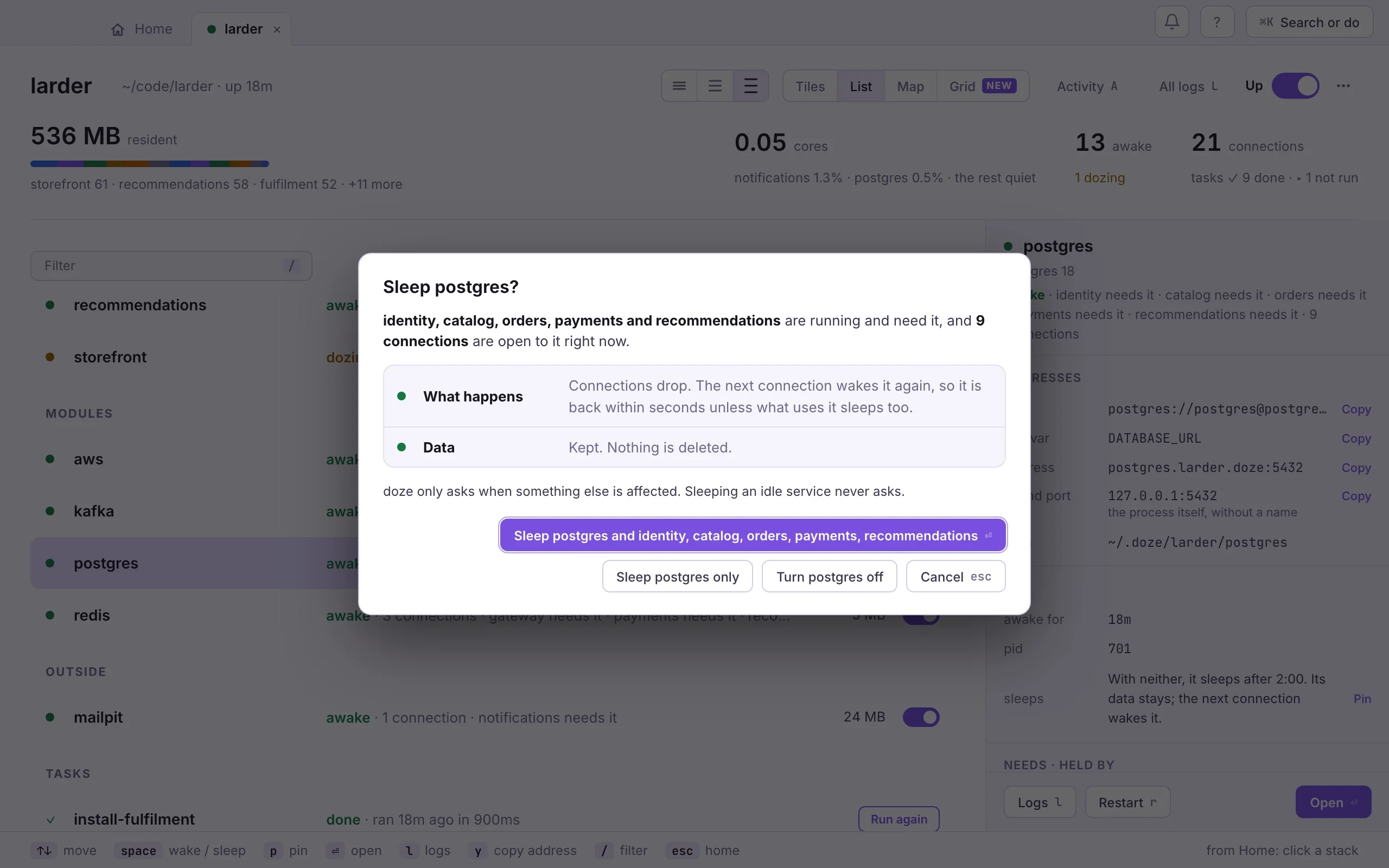
- Flip the service’s switch on its tile or row, or select it and press space. An awake service goes to sleep; an asleep one wakes.
- If something is using it, doze asks first: sleep it and what needs it, sleep it only (what uses it will wake it again), or turn it off.
- To keep it awake, open the service and click Pin awake, or press p. Unpin lets it sleep again.
- space
- wake · sleep: the same switch as on a tile
- w s
- wake · sleep
- p
- pin awake · unpin
doze sleep db # stop it now; data stays, the next connection wakes itdoze sleep # everything that is awake (the daemon keeps running)doze wake api # start it and what it depends on, and wait until readydoze wake # every enabled servicedoze pin db # keep it awake with nobody connecteddoze pin db --off # let it sleep againA pin lasts until the stack goes down.
Take one out of the run
Section titled “Take one out of the run”Sleeping is temporary: the next connection wakes the service. Off keeps it down: connections to it fail, and a service that needs it cannot start, until you turn it back on. Use it to run something from your editor instead, or to see how the rest copes without it.
- Flip the service’s switch. When something uses it, doze asks first, and the dialog has a Turn … off button. A crashing service’s page offers Stop trying, which does the same.
- Flip the switch again to turn it back on and wake it.
doze off payments # stop it and keep it stoppeddoze on payments # back in the run; it wakes on its next connectionOff is for this run only: it is not written to doze.hcl, and it ends when the
stack goes down. To keep a block declared but never started, set
enabled = false in its block.
Start part of a stack
Section titled “Start part of a stack”doze up with no names starts everything. Name services to start only
those and what they need:
doze up gateway catalogdoze remembers what you started. The next plain doze up asks whether to
start the same again; --last and --all answer without asking:
doze up --last # what was started last timedoze up --all # everythingWith no terminal to ask on, as in CI, a plain doze up starts everything.