
Which terminal was that?
Seven things, seven ways to start them. doze.hcl says how each one runs, doze up starts them all, and the app keeps each one's logs.
 doze
Run your whole stack. Feel none of it.
Postgres, Kafka, a whole local AWS and your own services, running natively on your Mac, each awake only while your code is using it. No VM. No port clashes. No setup doc.
Get the doze app$ brew install --cask doze-dev/tap/dozePart of the doze family. Works alone.
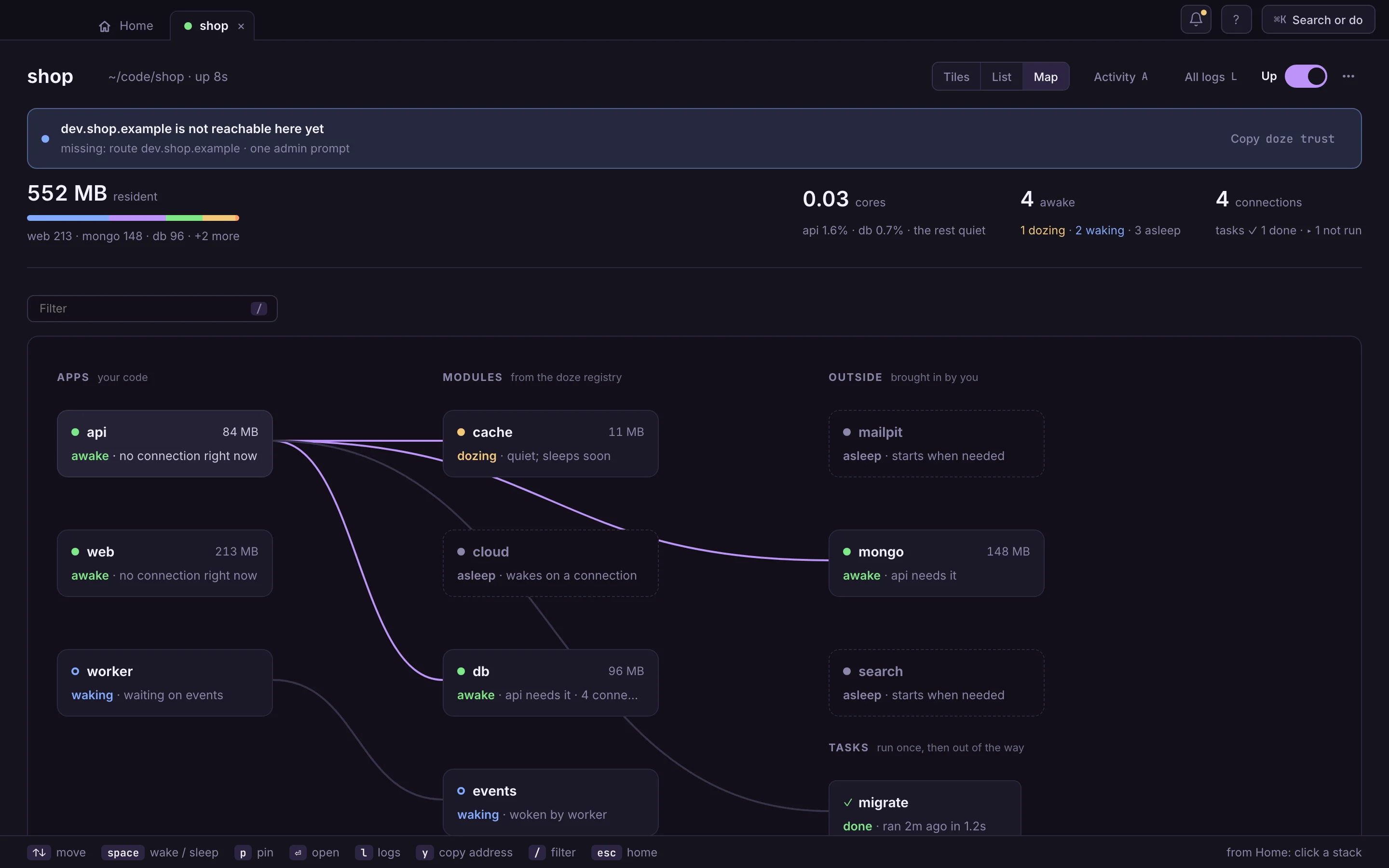
The doze app. Close the window and it stays in your menu bar; quit it and your stacks keep running. stand-in from the demo stack · app-rec-request-wakes.webm pending
Your first stack, in the app
Before the tour, the way in: from a fresh install to a running stack in three steps, all in the window.
The Library is home for every stack on this Mac. On a fresh one it shows three steps and two ways in, and the Machine line offers the one-password setup that gives your services names.
Drawn from the app's own screen · capture pendingdoze reads the folder’s go.mod and Go imports, package.json, compose files, a Makefile and the variables the code asks for, like DATABASE_URL, and lists what it found and where. Here, Larder’s gateway, before it had a doze.hcl. Nothing starts. Set it up from this repo writes doze.hcl, with the reason above each block.
One switch brings the stack up, each service after what it needs; what nobody calls goes to sleep. Next time Up starts what you had up last time. The menu beside it offers Start everything or Choose what starts…: tick the apps you’ll work on, and what they need comes too.
Drawn from the app's own screen · capture pendingPrefer the terminal? doze init && doze up in the folder does the same, and the app shows the stack either way.
doze is an app first. Eight stops, each a real screen. Scroll inside the frame, use the arrow keys, or pick a stop from the dots.
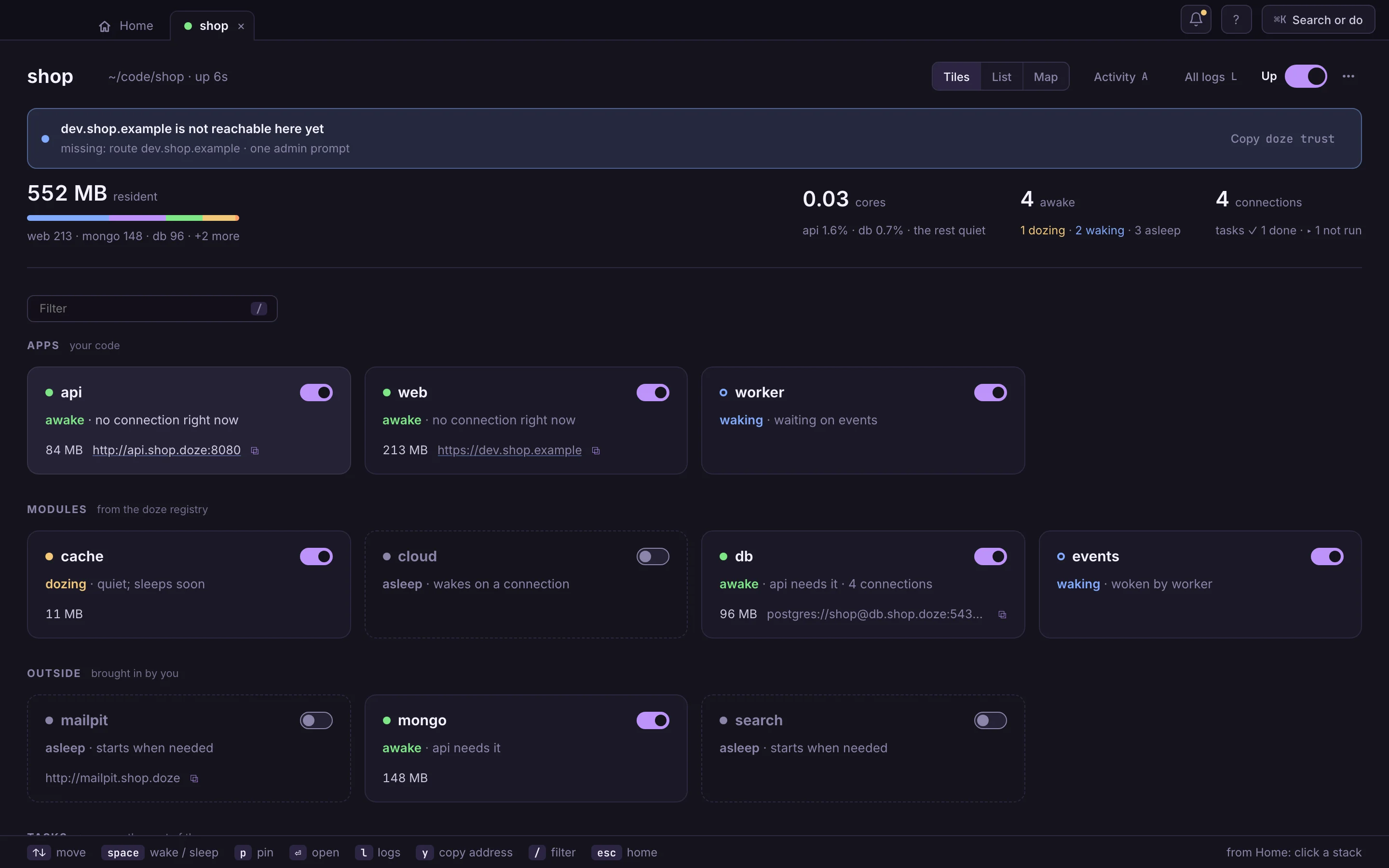
So a script, a Makefile or CI can do what you just clicked. Over SSH, with no screen, doze is a dash in your terminal; piped, it prints the status table.
doze updoze wake catalogdoze sleep postgresdoze pin postgresdoze logs gatewaydoze url postgresdoze downdoze status --json$ doze up ✓ migrate-catalog, migrate-orders … ran ✓ storefront http://storefront.larder.doze ✓ gateway http://gateway.larder.doze ○ catalog asleep, wakes on a connection ○ mailpit asleep, wakes on a connection $ psql "$(doze url postgres)" # its connection string; postgres wakes on the connection $ doze run -- go test ./... # the same file runs your tests in CI
doze up.doze.hcl says what your app needs; doze.lock pins every engine, byte for byte, so your Postgres is your teammate's Postgres. This is a slice of the one in Larder, a made-up grocery service we built as our example: seven services in Go, Python and TypeScript, a gateway and a web shop.
doze truststack = "larder" defaults { sleep = "2m" } module postgres "postgres" { version = 18 role "catalog" { password = "catalog" } schema "catalog" { owner = "catalog" } } module kafka "kafka" { version = 4 auto_create_topics = false topic "orders.placed" { partitions = 3 } } task "migrate-catalog" { run = "go run ./platform/cmd/migrate services/catalog/migrations" inputs = ["services/catalog/migrations/*.sql"] } app "catalog" { run = "go run ./services/catalog" port = 8002 after = [task.migrate-catalog] env = { DATABASE_URL = "postgres://catalog:catalog@${module.postgres.address}/postgres" } }
Your own domain
Sign-in providers won’t send you back to localhost subdomains or .test. Cookies, CORS and HSTS care which host they’re on. So put your real dev domain in doze.hcl, run doze trust once, and https://dev.acme.com is your laptop, padlock and every tenant subdomain included. No proxy to configure, no hosts file, no port in the URL.
app "web" {
  run     = "pnpm dev"
  port    = 3000
  domains = ["dev.acme.com", "*.dev.acme.com"]
}

$ doze trust   # once: one password prompt
Containers, brew services, half-remembered ports and a setup doc that worked once. Here is each small embarrassing truth, and what changes.
Seven things, seven ways to start them. doze.hcl says how each one runs, doze up starts them all, and the app keeps each one's logs.
Every service gets a name of its own, like gateway.larder.doze in our example. Two projects can both have their 5432, and you stop keeping ports in your head.
No VM holding every database all day. Native processes that sleep when nothing calls (after two minutes, in Larder) and wake on the next connection.
Every command answers in --json: status, logs, the connect line. The agent in your terminal can read your stack instead of guessing at it.
The setup doc is doze.hcl, and it runs. Clone, doze up, and the map shows the services you've never met and who needs whom.
Quiet services already went to sleep on their own. The menu bar shows what's still awake, and doze down puts a whole stack to bed.
Teams gave up on local and moved to remote dev environments run by a platform team. Debuggers that won't attach through the tunnel. Port-forwards to juggle. Logs in another tool. And when the dev environment is down, with no ETA and the platform team busy with production, nobody can work. You needed a platform team just to write code, while the most powerful machine you've ever owned sat on your desk.
No SDK, no base image, no plugin per language. Each team keeps its toolchain; doze gives every service a name, a port, its connection strings, and sleep.
run = "go run ./services/orders"run = "uv run --frozen python -m fulfilment"run = "bun run dev"run = "[the command you type today]"Both are good tools. Containers win at shipping. For the code you write all day, here is what changes.
| Question | doze | docker compose |
|---|---|---|
| What runs | Native processes | Containers in a Linux VM |
| While you're in a meeting | Asleep | Running |
| Memory at rest | [measured, named Mac] | [measured, same Mac] |
| Your debugger | Attaches to a local process | Crosses a VM boundary |
| Two projects on 5432 | Fine: each has its own address | Remap one by hand |
| Three languages in one repo | Each runs with its own toolchain | A Dockerfile per service |
| https on your own domain | One line, one password prompt | A proxy and a CA you set up |
| Shipping to production | Not its job | Images you can ship |
Doze.app for Apple silicon: the window, the bat in your menu bar, and doze on your PATH, always the same version as the app. Open it and the Library walks you through your first stack; its Machine line offers one password prompt, for .doze names.
$ brew install --cask doze-dev/tap/dozeFor servers, CI and terminal people: the same doze, no window. Install the formula or the cask, not both: they conflict.
$ brew install doze-dev/tap/dozeLinux x86_64 and arm64: Homebrew, mise or a tarball. On Windows, WSL2.
Every way to installThree products, each its own download, each happy on its own. Together, doze runs the other two inside your stack and gives them names.

