



Domains and HTTPS
Give an app a real name under a public TLD, served over https on your machine, so sign-in callbacks, cookies and tenant subdomains work locally.
Give an app a real domain, served over https on your machine.
Every app already answers at its doze name, http://web.shop.doze. Some work
needs more than that: a sign-in provider such as Google sends a browser back
only to a name under a public top-level domain, over https, and a
tenant-per-subdomain product wants *.dev.acme.com. Those are a line in
doze.hcl and one admin prompt.
defaults {  names = true}
app "web" {  run     = "pnpm dev"  port    = 3000  domains = ["dev.acme.com", "*.dev.acme.com"]}
Domains need names on, so the defaults block says names = true.
Set up the machine for it
Section titled “Set up the machine for it”doze up runs the stack as before. If this machine is not set up for the
domains yet, it says so in one line:
› dev.acme.com needs a one-time setup here: doze trust (one sudo)- Open Settings › Machine (⌘,). A domain that is not set up yet is listed under its own heading, with the authority, and the banner says how many parts are missing.
- Press Repair and type your password into the system’s prompt. Repair runs
doze trustin each stack that declares domains. - Open the app’s page. Its Reach it card now starts with the domain.
doze trust # routes and the authority, one sudodoze trust --check # what is set up, no sudodoze trust --print # the script, to read or run yourselfdoze trust does two things in one prompt: it routes each domain (and
everything under it) to doze’s resolver, and it trusts the doze certificate
authority on this machine. The prompt names exactly what the script does. From
then on https://dev.acme.com reaches the app, and so does
https://tenant.dev.acme.com. doze url web prints the https address; the
app’s page shows it first and its Open button goes there; ⌘K offers to open
it.
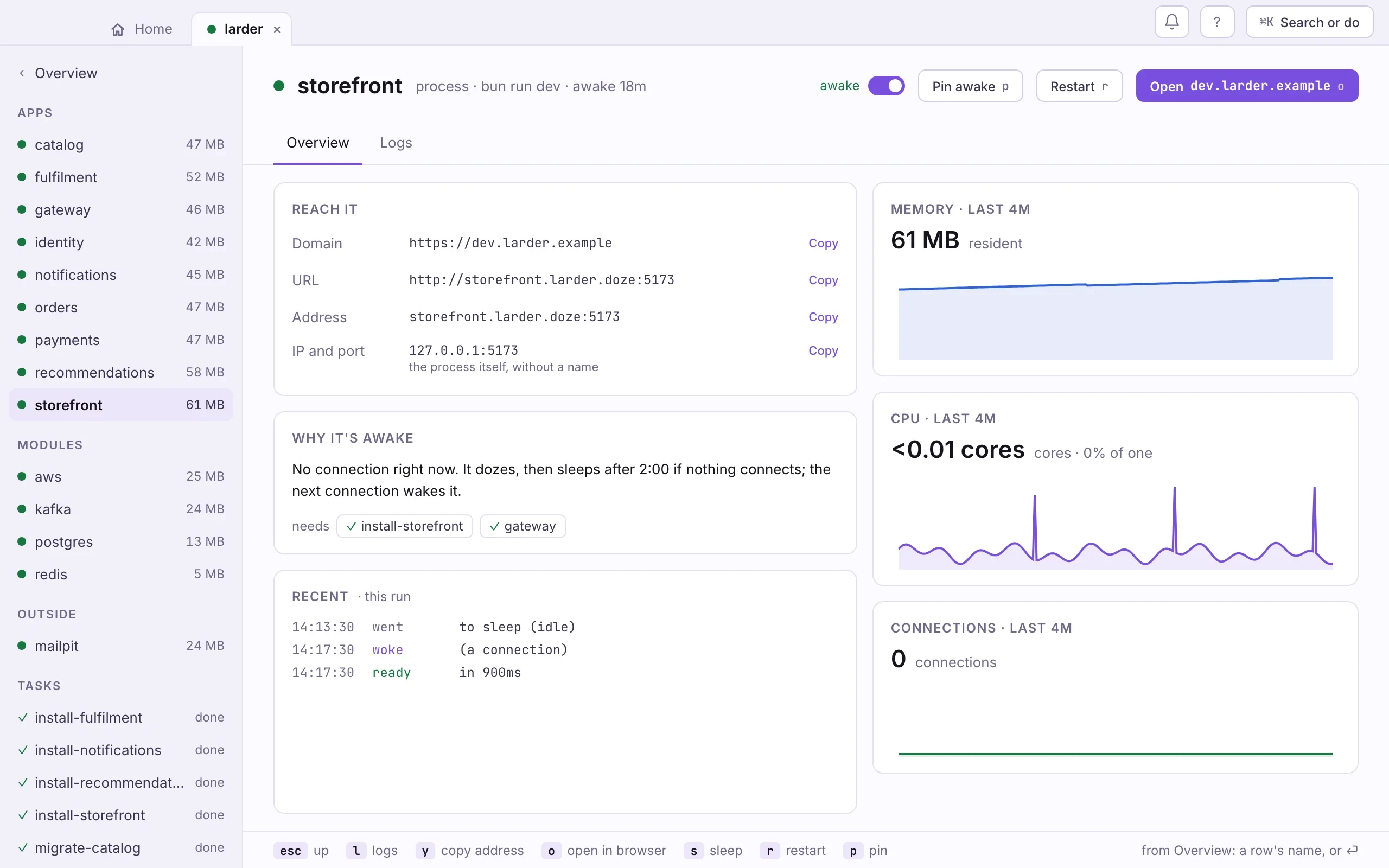
A wildcard covers one level, as certificates do: *.dev.acme.com serves
tenant.dev.acme.com and dev.acme.com itself, while
a.tenant.dev.acme.com resolves but fails the handshake. Containers inside
the stack do not see the machine’s resolver routes: from inside one, use
the app’s .doze name with its port.
What the authority is
Section titled “What the authority is”A certificate authority of this machine’s own, made the first time a domain
needs it, under ~/.doze/ca, with its key readable by you alone. The front
door mints a short-lived certificate per domain from it on the first https
request, and renews it before it expires. Be clear about what trusting it
means: the authority is trusted for TLS on this machine, and like any root
it could sign any name, so whoever gets hold of root.key could sign for
this machine. doze only ever mints names declared here; the key never
leaves the folder; keep the folder out of anything synced or shared.
doze trust --check shows the authority and when it expires; doze trust --rotate makes a new one, trusts it and stops trusting the old one in one
prompt, and works on an authority that has gone bad. A running stack serves
the new one at once; processes already running read the old root at their
start, so restart them.
Processes inside the stack need to trust it too, for calls between services
over https. doze sets SSL_CERT_FILE, NODE_EXTRA_CA_CERTS,
REQUESTS_CA_BUNDLE and DOZE_CA_FILE on every process it runs, so Go,
curl, Node and Python verify without being told. The two that replace a
client’s store point at a bundle of the machine’s own roots plus doze’s,
so public hosts keep working; a variable an app sets for itself in its
env block is left alone. Java reads its own store: import the file from
DOZE_CA_FILE with keytool if you need it.
Bringing your own certificate
Section titled “Bringing your own certificate”A team with a real certificate for the domain, or one from mkcert, keeps it:
app "web" { run = "pnpm dev" port = 3000 domains = ["dev.acme.com"] cert = "certs/dev.acme.com.crt" key = "certs/dev.acme.com.key"}The paths are relative to doze.hcl. doze serves that certificate for the
domain and trusts nothing of its own; doze doctor says whether the file
covers the name and when it expires. doze trust then installs the route
only.
Where things can get in the way
Section titled “Where things can get in the way”- Something else holds port 80 or 443 (Caddy, nginx). doze does not
contend:
doze doctornames what holds the port, and the domain still works with the app’s port in the URL. If you keep your own proxy, point it at the addressdoze url web --jsonreports. - The domain exists on the internet. While a stack declares it, this
machine resolves it to the stack. The moment no stack declares it, the
name is forwarded to your usual DNS and the real host is back: by the
stack that is running, or by doze’s network daemon, which answers the
zone whenever no stack does, from boot, on macOS and on Linux with
systemd. A machine set up before the daemon did this has
doze doctorsaying so;doze doctor --fix(one sudo) brings it up to date. On a Linux machine without systemd-resolved or dnsmasq there is no route and no daemon, and the domain is simply not served. - A VPN or management profile overrides DNS. macOS consults profiles
before
/etc/resolver;doze doctorreports a domain that does not resolve to the stack despite the route. - You already have a file in
/etc/resolverfor the domain. doze never writes over or removes a file that is not its own;doze trustsays so and leaves the domain to it. - Firefox before version 120 ignores the system keychain; newer versions read it. Chrome and Safari always do.
When a domain goes away
Section titled “When a domain goes away”Routes are machine-wide, so doze keeps a record of which project asked for
each. When a domain leaves doze.hcl, or the project folder is deleted, its
route is stale: doze up and doze doctor say so, and the next doze trust
removes it in the same prompt. Repair in Settings › Machine does the same.
doze trust --remove undoes this project’s routes at once, and the
authority’s trust with the last project that used it.
doze dns-setup --uninstall takes everything away.
Rules for the name
Section titled “Rules for the name”A domain is lowercase labels under a public top-level domain, optionally
one leading *.: dev.acme.com, *.dev.acme.com, app.acme.co.uk.
Not localhost or anything under it, not an address, and not a .doze
name, which every app has already. A name that is not under a public TLD
(dev.acme.test) is accepted, and doze doctor warns that sign-in
providers will refuse it.
Next: Settings and Doctor.